
Every lead is different. Sending them all to the same website is the fastest way to lose them. SalesMind AI fixes this by building a personal sales funnel for each lead — not the same generic steps for everyone.
The key to this is the Adaptive Microsite. It is a personal landing page that SalesMind AI generates for each lead. It updates on its own based on who the lead is and how they behave. This guide covers what Adaptive Microsites are, how to generate them, and how to train your agent to make them better.
1. What an Adaptive Microsite Is
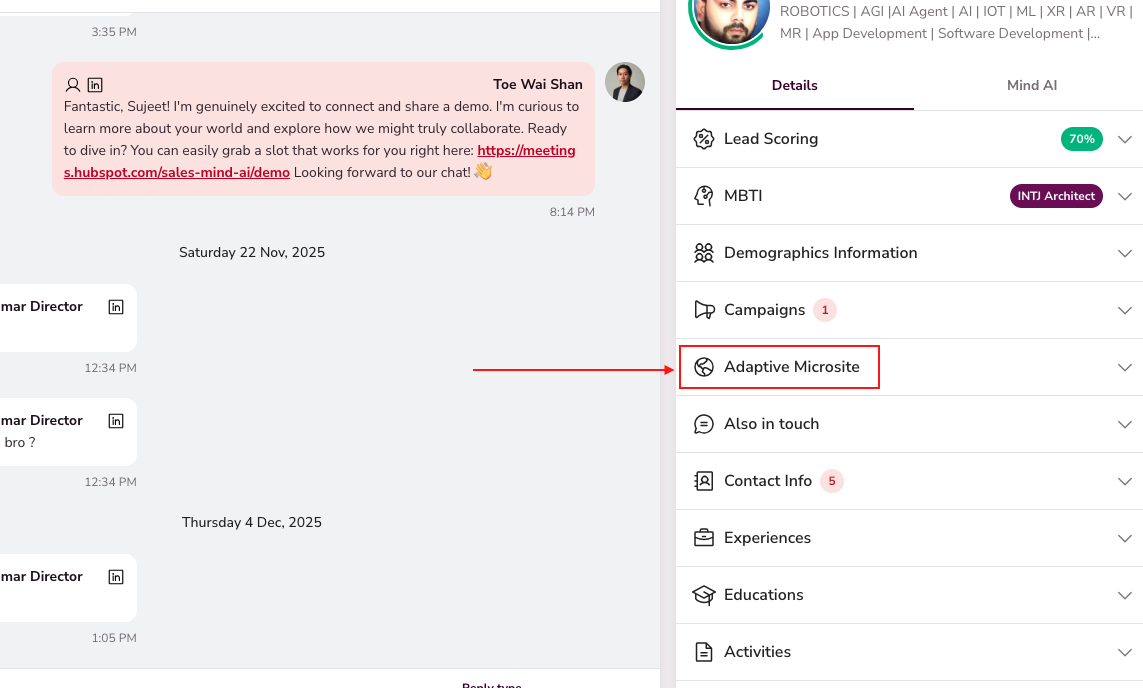
An Adaptive Microsite is a personal landing page your agent builds for each lead. Instead of sending every lead to your company website, SalesMind AI creates a dedicated page for that one person. The page gets built around their job role, company, industry, pain points, and personality type.
Think of it as that lead's own version of your website. The value props, the case studies, the CTAs, and even the writing tone all match what matters to that specific person.
Every microsite includes:
- Tailored value props based on their job title, company size, and industry.
- Dynamic content and case studies that match their actual pain points.
- Custom copy and CTAs that match their personality type (MBTI).
The Two Links: Buyer Link & Internal Preview
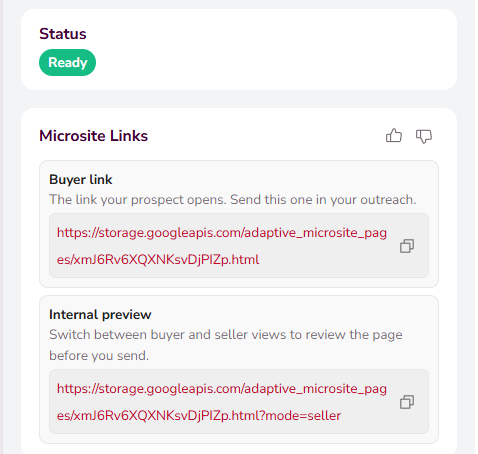
When you generate a microsite, SalesMind AI creates two separate links:
-
Buyer link — This is what your lead sees. It is their personal landing page with tailored content, case studies, and CTAs. Send this link in your outreach messages. The lead cannot switch views. They only see the page built for them.
-
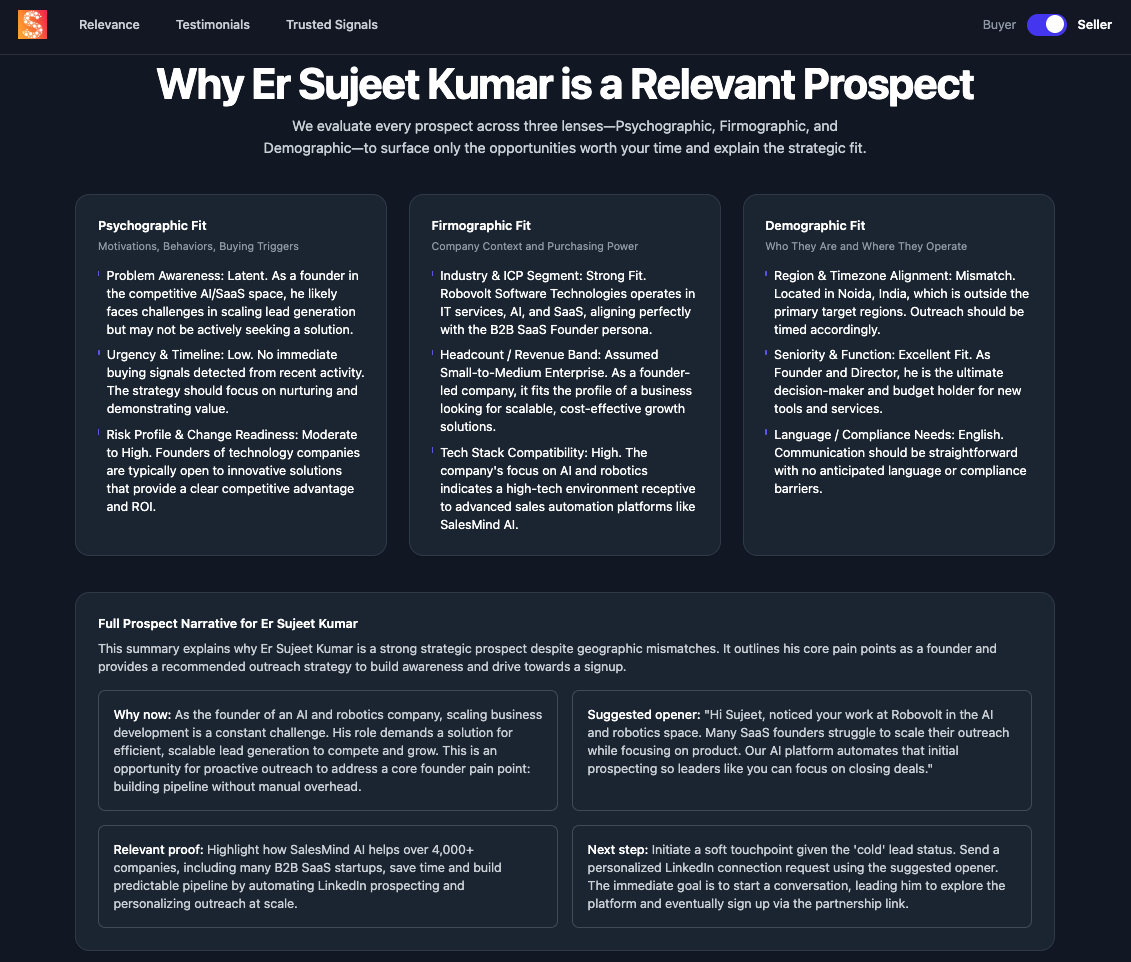
Internal preview — This is for you. It opens the same page but adds a toggle in the top-right corner to switch between two views:
- Buyer view: Shows exactly what the lead will see. Use it to check the page before you send it.
- Seller view: Shows a full briefing about the lead — their profile, company info, pain points, and a suggested sales script for the meeting. Think of it as a one-pager cheat-sheet before a call.
💡 Tip: Open the Internal preview and switch to Seller view right before a meeting. You get an instant brief on the lead and the best angle for the conversation.
How the Microsite Updates Itself
The microsite is not static. It changes on its own based on how the lead behaves. SalesMind AI tracks how each lead interacts with their page:
- Did they scroll?
- Did they click a button?
- Did they watch a video?
- Did they read the content?
- Did they come back later?
These signals tell the AI how interested the lead is. The page and funnel respond:
| Intent level | What the AI does |
|---|---|
| High | Pushes content toward the booking CTA |
| Medium | Shows more value, social proof, or case studies |
| Low | Starts a light nurturing sequence |
The microsite can update the headline, the offer, the CTA, the urgency, and the layout on the fly. A lead who comes back a week later may see a different page than on day one.
👉 Note: The microsite is the center of the experience — not the messages. Messages drive leads to their microsite. The real conversation happens there.
2. A Funnel Built for Each Lead
Old-style funnels are fixed. Every lead goes through the same steps, sees the same messages, and lands on the same website.
SalesMind AI works differently. Before building the lead's microsite and choosing which messages to send, the AI checks:
- Job title
- Industry
- Company
- Persona match
- Past interactions
- Interest level
Then it picks the best funnel path for that person. It decides the message angle, the resources to show, the content on their microsite, and how fast to push toward a meeting.
| Lead type | What they get |
|---|---|
| Needs social proof | Case studies and testimonials |
| Value-focused | ROI-driven content |
| Ready to convert | Direct push to book |
👉 Note: Each lead gets what fits them — not a generic path.
3. How to Generate an Adaptive Microsite
You can generate microsites in two ways: manually from the Inbox, or on its own as part of a campaign.
Manual Generation in the Inbox
- Open your Inbox and pick a conversation.
- In the right panel, find the Adaptive Microsite card.
- If no microsite exists yet, click "Generate Adaptive Microsite".
- The status badge switches to "Pending" while the agent writes the copy and builds the layout.
- Once done, the status changes to "Ready" and shows two links: the Buyer link and the Internal preview.
Automatic Generation
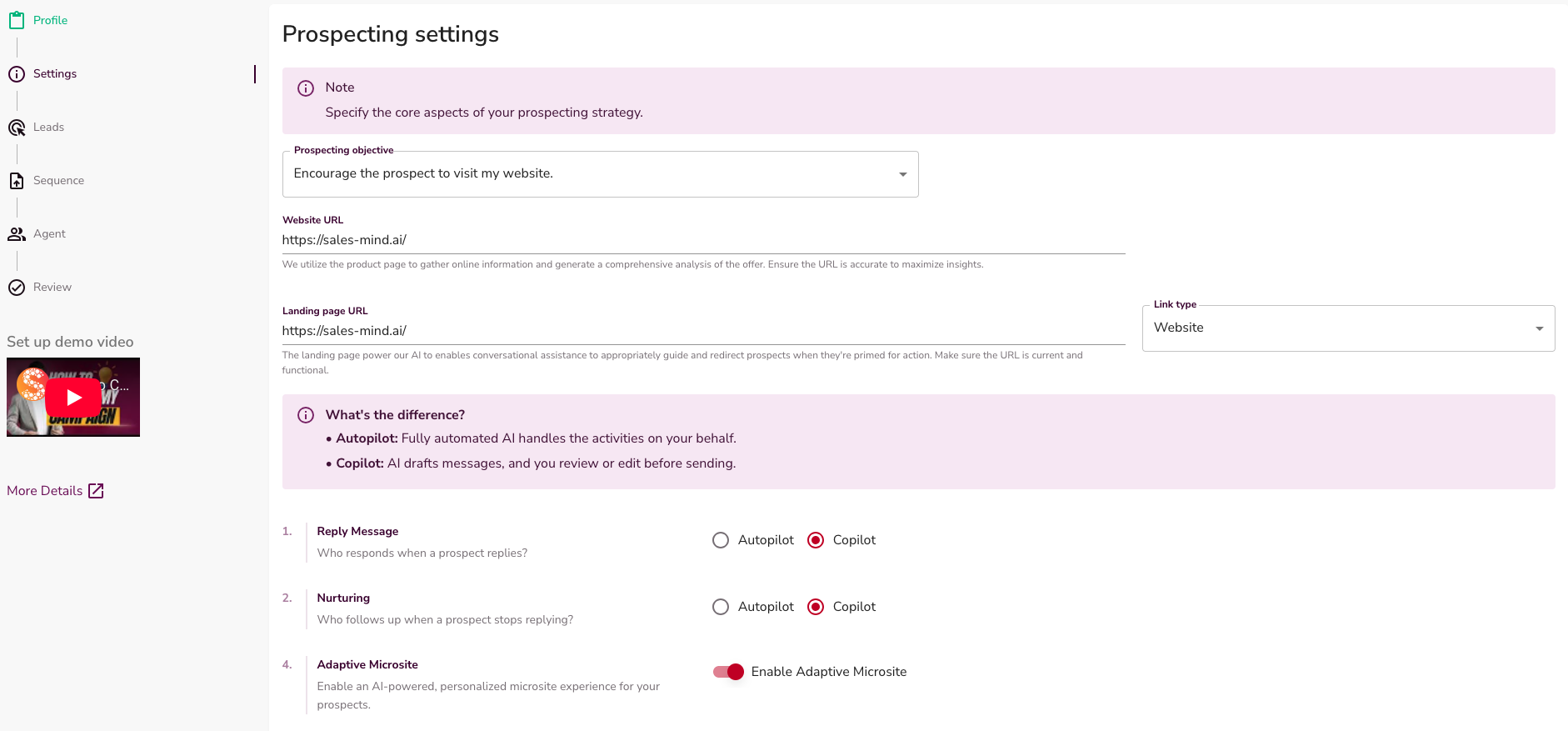
When you set up a campaign, add the template variable {{microsite_url}} in your outreach sequence. The agent builds the landing page for each lead before the sequence starts.
4. Reviewing and Sharing the Microsite
Once the status is "Ready", you can:
- Open the Buyer link — See exactly what the lead will see. This is the link you send in your outreach.
- Open the Internal preview — Toggle between buyer and seller views. Check the page before you send it, and review your sales brief.
- Copy the Buyer link — Click the Copy URL icon to grab the link for your clipboard.
- Regenerate — If you update the lead's info, MBTI profile, or campaign persona, click "Regenerate Adaptive Microsite" to rebuild the page with fresh context.
5. MBTI & Microsites
Adaptive Microsites match the lead's personality analysis from the right panel in the Inbox.
- Analytical types (INTJ, INTP, etc.): The copy highlights hard metrics, data, and technical details.
- Action-oriented types (ESTP, ENTJ, etc.): The copy focuses on speed, ROI, and direct next steps.
- Collaborative types (ENFJ, ESFJ, etc.): The copy highlights team benefits and trusted partnerships.
Before you generate or regenerate a microsite, check the lead's MBTI chip. If you change the MBTI profile, regenerating the microsite adapts the copy to match right away.
6. Training Your Agent with Microsite Feedback
Your feedback is the most valuable signal to make your agent smarter. Do not keep corrections in your head. If a microsite is great — or if the tone feels off — tell the agent right away:
- Find the thumbs-up 👍 or thumbs-down 👎 icons next to the Microsite Links header.
- Click either thumb to open the Feedback Drawer.
- If you voted thumbs-down, pick the reason (e.g., "Mismatch with target" or "Wrong tone") and add a short comment.
- Click Save.
The agent reads every submission. It uses your feedback to improve future layouts, content, and copy for your team's campaigns.
7. What the AI Handles vs. What You Do
The AI runs the funnel logic and microsite experience — not every outreach message.
The AI handles:
- Microsite updates (both buyer content and seller briefings)
- CTA changes
- Content adjustments
- Intent detection
- Moving hot leads toward booking
- Giving cold leads more education
Your job:
- Take the meeting when they book.
SalesMind AI handles the funnel that gets them there.
Key Takeaways
- The Adaptive Microsite is a personal landing page your agent builds for each lead — that lead's own version of your website.
- Two links get generated: the Buyer link (send to the lead — no toggle) and the Internal preview (for you — with a buyer/seller toggle).
- Seller view is your briefing: lead profile, company info, pain points, and a sales script.
- The page updates on its own based on the lead's role, pain points, MBTI, and behavior.
- Generate microsites manually from the Inbox or on their own with
{{microsite_url}}in campaigns. - Hot leads move faster. Cold leads get nurturing. The AI picks the next step.
- Give thumbs-up / thumbs-down feedback so your agent learns and improves.
- You focus on meetings. The AI handles the funnel.
What Good Looks Like
A strong microsite strategy includes:
{{microsite_url}}added to your campaign message templates.- Internal preview checked before every meeting for a quick brief on the lead.
- Feedback submitted on both great and weak microsites.
- A weekly check of the AI Feedback dashboard to track your agent's progress.